
- Free
- Nothing uploaded
- MySQL, PostgreSQL, SQLite, SQL Server
How to use it
- Add your SQLPaste the INSERT statements, or open a .sql file. Several tables in one file are fine.
- Check the previewPick a table and rename its columns if you like. Choose how NULL is written and which separator the CSV uses.
- DownloadSave the table as a CSV file, copy it, or save all tables as a .zip.
Good to know
Values are written exactly as the SQL has them: 007 stays 007, a 20-digit id keeps all its digits and 12.50 stays 12.50. An expression such as NOW() or DEFAULT is written as its text, not worked out. A CSV file has no types, so numbers, dates and text are all plain text in it. Only INSERT ... VALUES statements give rows, so check the result against your data before you rely on it.
Worked example: two INSERT statements, one table
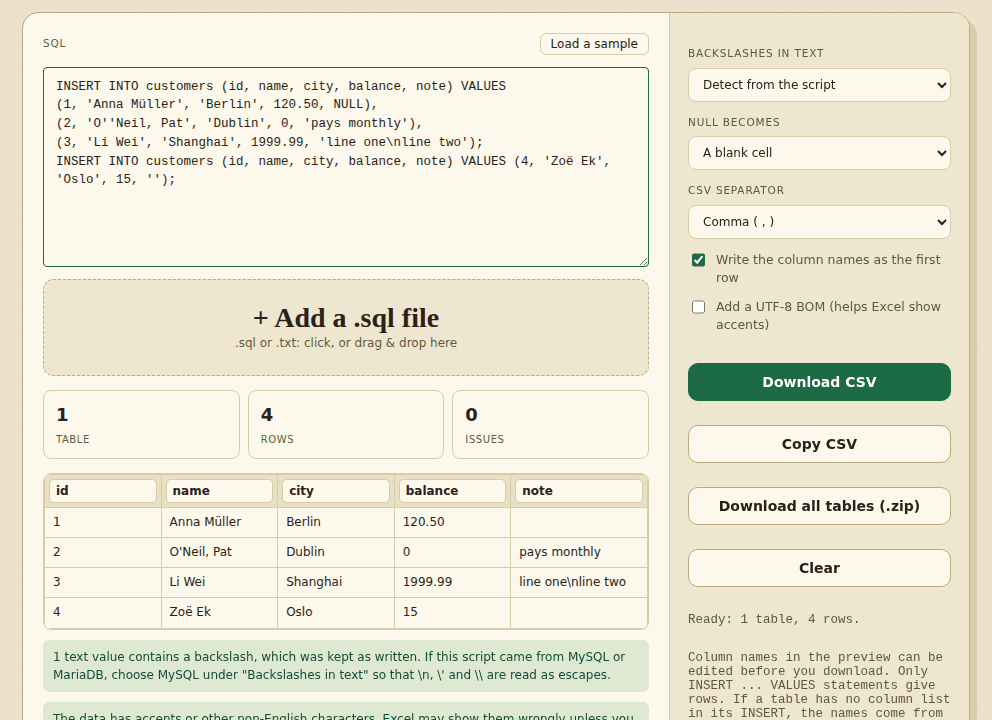
We pasted this SQL, with a NULL, an apostrophe inside a name, a comma inside a name and an empty string:
INSERT INTO customers (id, name, city, balance, note) VALUES
(1, 'Anna Müller', 'Berlin', 120.50, NULL),
(2, 'O''Neil, Pat', 'Dublin', 0, 'pays monthly'),
(3, 'Li Wei', 'Shanghai', 1999.99, 'line one\nline two');
INSERT INTO customers (id, name, city, balance, note) VALUES (4, 'Zoë Ek', 'Oslo', 15, '');
The tool found 1 table, 4 rows and 0 issues, and wrote customers.csv with the column names as the first row:
id,name,city,balance,note
1,Anna Müller,Berlin,120.50,
2,"O'Neil, Pat",Dublin,0,pays monthly
3,Li Wei,Shanghai,1999.99,line one\nline two
4,Zoë Ek,Oslo,15,- Both statements ended up in one table. Rows from several INSERT statements into the same table are joined.
- The doubled apostrophe in
'O''Neilbecame a single one, and the name with a comma is wrapped in quotes so the comma does not split the cell. - NULL became a blank cell, the same as the empty string in row 4. Choose The text NULL if you need to tell them apart.
- The backslash in the last note was kept as written, and the tool said so. That is right for standard SQL. If the script came from MySQL or MariaDB, choose MySQL under Backslashes in text and
\nbecomes a real line break. - The accents were read correctly, and the tool warned that Excel may show them wrongly unless Add a UTF-8 BOM is on. Turn it on when the file is going to Excel.
Frequently asked questions
What SQL does it read?
INSERT ... VALUES statements, including multi-row INSERTs, INSERT IGNORE, REPLACE INTO, and the INSERT [dbo].[Table] form that SQL Server scripts use. Other statements such as UPDATE and DELETE are not turned into rows. CREATE TABLE is read only for its column names. An INSERT ... SELECT has no values to read, so it is reported and skipped.
Is my data uploaded?
No. The SQL is read in your browser. Your SQL and the CSV are not saved; only your option choices are remembered.
Where do the column names come from?
From the column list of the INSERT, when it has one. If not, from the CREATE TABLE in the same script, when the number of columns matches. Failing both they are called column_1, column_2 and so on, and you can rename them in the preview before you download.
What does the Backslashes in text option do?
MySQL and MariaDB read a backslash in text as an escape, so \n is a line break and \' is a quote. PostgreSQL, SQLite and SQL Server keep a backslash as it is. By default the tool looks at the script, decides, and tells you what it chose. If a path such as C:\temp looks wrong, or a line break shows as \n, change the option.
Can it read a pg_dump file?
Only a dump made with INSERT statements (pg_dump --inserts or --column-inserts). The default pg_dump format stores rows in COPY blocks, which this tool skips and tells you about.
Can I convert a big file?
Yes. Open it as a file. The whole script is read in your browser's memory, the preview shows the first 200 rows of a table, and Download gives every row. For a very large dump, download one table at a time.
How is NULL written?
As a blank cell, or as the text NULL if you choose that. By default an empty text value and NULL both look blank, so choose the text NULL option when you need to tell them apart.
Why does Excel show 7 instead of 007?
The CSV holds 007 exactly as the SQL had it. Excel turns it into a number when you open a CSV by double-clicking it. To keep it, use Data > From Text/CSV in Excel and set that column to Text before you load it.
Can I go the other way?
Yes. The CSV to SQL tool turns a CSV into INSERT statements for MySQL, PostgreSQL, SQLite or SQL Server.
Where to go next
- To create INSERT statements from a CSV, use CSV to SQL.
- If the dump repeats rows, remove duplicate rows from the CSV.
- To see the table as a picture, draw a chart from the CSV.
When people use it
- A database dump has INSERT statements and you want to see the rows in Excel.
- You want to hand a table from a SQL file to someone who does not use databases.
- You need to check what a script would insert before you run it.