
- Free
- Nothing uploaded
- Approximate layout
How to use it
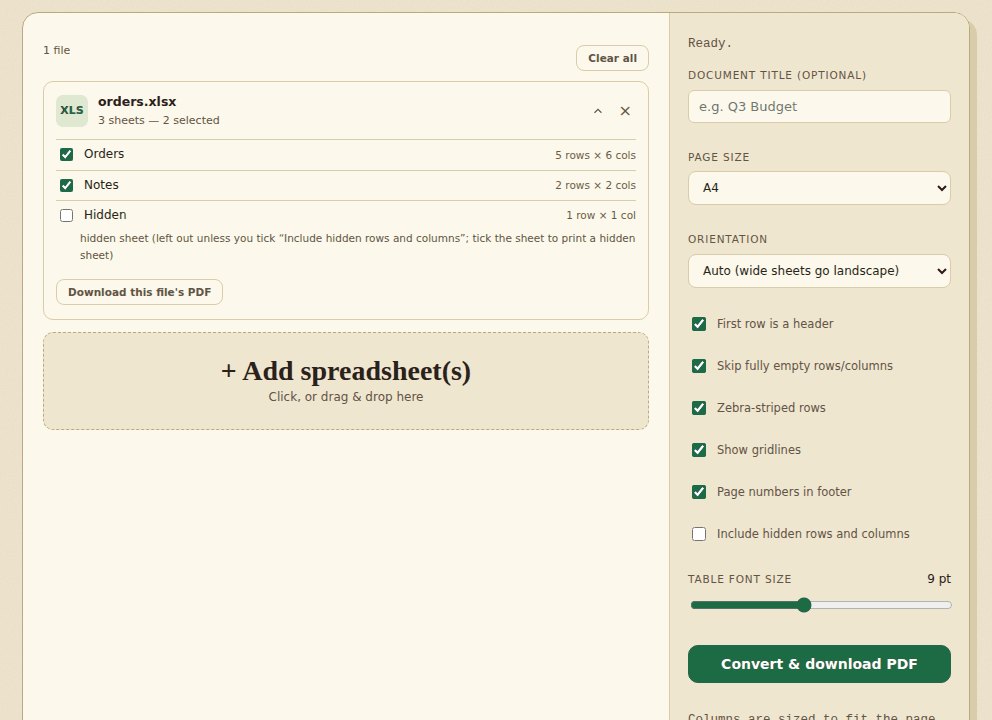
- Add your fileOpen a spreadsheet or CSV, then tick the sheets you want.
- ConvertChoose the page size and options, then create the PDF.
- DownloadSave the PDF and check the layout.
Good to know
The PDF shows the values as a plain table. Colours, fonts, charts, images and merged cells are not reproduced, and page breaks can differ from Excel. Letters outside Western European languages (for example Chinese, Arabic or Cyrillic) cannot be drawn and appear as “?”. Open the PDF and check it before you share it.
What you get: a worked example
We converted a small order sheet with six columns (order number, date, customer, zip code, total, note), one text cell with a line break, one merged heading row and a second sheet called Notes. With A4 and the default settings the PDF had two pages: the Orders sheet, then the Notes sheet on its own page, with a footer reading 1/2 and 2/2. Text, dates as the sheet shows them (05/03/2026), the zip code with its leading zero (01234) and the amount with its thousands separator (1,234.50) all came through.
Things that did not match Excel:
- Formulas without a saved result print blank. The PDF uses the value Excel last saved. A file written by a script that never calculated its formulas has no saved value, so the cell is empty. Open it in Excel, save it, and convert the saved copy.
- Other alphabets. A sheet with Cyrillic and Chinese text gave “?” in those cells, and the tool said: “2 cells in this sheet have characters the PDF cannot draw … They are printed as “?”.” Western European accents such as
Zoë café ñprinted correctly. - Merged cells are not merged in the PDF, so a merged heading shows in its first cell only.
How pages and orientation are chosen
- With Auto, a sheet with 14 columns came out landscape and a sheet with 3 columns portrait. You can force either.
- Choose A4 or Letter. We checked the page size of the PDF for both, in portrait and landscape.
- With “First row is a header” on, the header row repeats at the top of every page of a long sheet.
- Hidden sheets, rows and columns are left out unless you tick “Include hidden rows and columns”.
- Page numbers in the footer can be switched off.
A sheet of 20,000 rows by 6 columns made a 500-page PDF of about 26 MB, in around 5 seconds. The limit is 600,000 cells in one sheet; a sheet of 100,001 rows by 6 columns was refused with: “The sheet “Over” is too large for one PDF … Split the file into smaller files first, or untick this sheet.” You can cut a big file down with Split a file. To read the sheet on screen before you print it, open it in the XLSX reader.
How we tested this
On 31 October 2026 we ran the live page in headless Chromium on a Linux cloud server, driving it the way a person would (adding files, clicking the buttons, saving the download) and checking the files it produced.
| What we checked | Result |
|---|---|
| Page size A4 and Letter, portrait and landscape, Auto orientation for a wide and a narrow sheet (12 checks) | 12 of 12 |
| A three-sheet workbook with one hidden sheet and one hidden row: hidden sheet and row left out, both visible sheets printed, header repeated on later pages, page numbers on and off, hidden row printed when ticked | 7 of 7 |
| A formula with a saved result prints the result; Latin accents print; Cyrillic and Chinese print as “?”, with the note | 3 of 3 |
| 20 random sheets with 2 to 6 columns and up to 40 rows of text with accents, ampersands and percent signs: every cell value found in the text of the PDF (A4 and Letter) | 20 of 20 |
| 20,000-row sheet complete in the PDF; sheet over 600,000 cells refused with a message; no page errors; no requests to other sites | 4 of 4 |
| Total | 46 of 46 |
Not tested: Exact appearance. We read the PDF text with pdftotext and checked page sizes with pdfinfo, but we did not compare fonts, colours or column widths against Excel, because the tool does not aim to match them.
Frequently asked questions
Will it look exactly like Excel?
No. It is an approximation and is not pixel-perfect. Cell colours, fonts, charts and images are not carried over.
Is my file uploaded?
No. The conversion happens in your browser. The page keeps a copy of the files you add on your device so they are still there after a reload, until you remove them or use Clear saved data in the menu.
Can I convert only one sheet?
Yes. After you add a file, tick the sheets you want. Empty sheets are skipped and hidden sheets start unticked.
Are hidden rows and columns printed?
No, as in Excel. Tick “Include hidden rows and columns” if you want them in the PDF.
What happens to Chinese, Arabic or Cyrillic text?
The PDF font covers Western European letters only. Other characters are printed as “?” and the tool tells you how many cells are affected. For those files, use Save as PDF in Excel.
How big a sheet can it handle?
Up to 600,000 cells in one sheet, for example 100,000 rows of 6 columns. A larger sheet is refused with a message, so split the file first.
Where to go next
- For data rather than a printout, convert the sheet to CSV.
- To add a picture to a report, make a chart from a CSV.
- To check the sheet before converting, open it in the viewer.
When people use it
- You need to send a price list to a client who has no Excel.
- A sheet has to be printed or attached as a document that nobody can edit by accident.
- You want a quick PDF copy of a CSV report for a meeting.