
- Free
- Nothing uploaded
- Exact and fuzzy matching
How to use it
- Add your CSVOpen the file you want to clean. The tool is chosen with the two buttons above the drop area.
- Pick a cleaner“Clean and remove duplicates” trims cells and removes empty rows and exact duplicates. “Find near-duplicates” lists rows that are almost the same so you can choose which to remove.
- DownloadCheck the preview or the groups, then save the cleaned file. Your original file is not changed.
Good to know
“Clean and remove duplicates” can trim spaces around every cell, remove empty rows, remove duplicate rows, and tidy invisible characters (it removes stray byte-order marks, turns non-breaking spaces into normal spaces and joins accents written as separate marks). Duplicates are exact and case-sensitive, compared after trimming, either on the whole row or on one column you choose; the first row is kept. A row with a blank value in the chosen column is never counted as a duplicate. If a row has more or fewer values than the header, short rows are padded with blanks and extra values are kept. The cleaned file uses the original separator (comma, semicolon, tab or pipe) and is UTF-8 without a byte-order mark; if Excel shows accents wrongly when you double-click it, open it with Data > From Text/CSV and choose UTF-8. A file that is not UTF-8 is flagged, because some characters cannot be read. Cells beginning with = + - or @ are written exactly as they were. “Find near-duplicates” needs a header row. It compares one column, or the whole row, and counts two values as matching when their similarity (based on the number of single-character edits) reaches the threshold you set, from 50% to 100%. Rows are linked through chains of matches, so a group can hold values that are not all close to each other: look at each group before you delete anything. It keeps the first row of a group and ticks the others for removal, and you can untick any of them. It handles up to 10,000 rows because every row is compared with every other row; in our test 10,000 short names took about 15 seconds, and long values or very similar rows take longer. A scan can be stopped. Switching between the two buttons starts over, so add the file again. The options are remembered in this browser; your files are not stored.
Worked example: the same customer twice
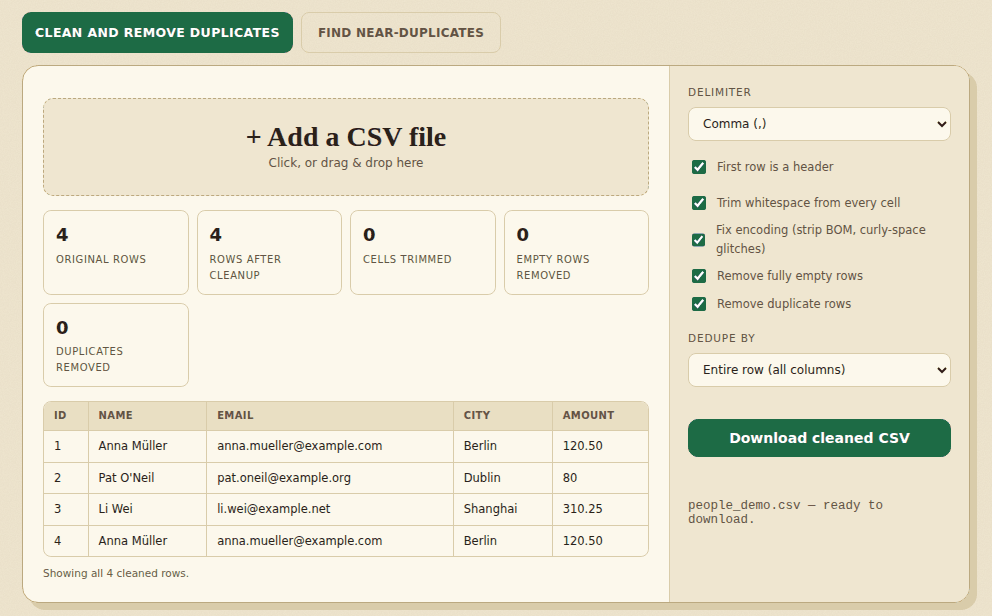
We used the four-line customer list from the anonymize page, where row 4 repeats row 1 except for its id. With First row is a header and Remove duplicate rows turned on, the tool compared the entire row and found 0 duplicates: 4 rows in, 4 rows out. The ids 1 and 4 make the rows different.
We then chose the email column in the list under the checkbox. The tool reported 4 original rows, 3 rows after cleanup and 1 duplicate removed, and wrote this file:
id,name,email,city,amount
1,Anna Müller,[email protected],Berlin,120.50
2,Pat O'Neil,[email protected],Dublin,80
3,Li Wei,[email protected],Shanghai,310.25- The first row with a given email is kept, and later ones are dropped.
- If a file has a unique id on every row, comparing the whole row finds nothing. Pick the column, such as email or order number, that makes two rows the same thing.
- Looking for the same person spelled differently? That is a different job. Use the Find near-duplicates tab on this page.
Frequently asked questions
What is the difference between the two tools?
“Clean and remove duplicates” removes whitespace problems, empty rows and rows that are exactly the same. “Find near-duplicates” finds rows that are almost the same, such as small typos or different capitals, and lets you decide which to remove.
Is my data uploaded?
No. Everything runs in your browser and nothing is sent to a server. After your first visit the page also works offline.
Will it change my original file?
No. You download a new file, named like yours with “-cleaned” or “-deduped” added, and the original is not touched.
How many rows can it handle?
The cleaner has no fixed limit; in testing, a 300,000-row file was cleaned in a few seconds. The near-duplicate finder accepts up to 10,000 rows. For a bigger file, split it first or clean out the exact duplicates, then scan the rest.
Does it find duplicates written in other languages?
Yes. Letters and digits of any script are compared, so values in Chinese, Arabic, Cyrillic or accented Latin text are matched, not skipped.
Will it delete rows I wanted to keep?
The cleaner removes only what you switch on. Near-duplicate rows are only suggestions: nothing is removed until you download, and you can untick any row first. Always review the groups, especially at a low threshold.
Can I clean an Excel file?
These tools read CSV and text files. To use an Excel sheet, export it as CSV first, for example with the XLSX to CSV converter on this site.
Where to go next
- Combining files first? Merge the CSV files, then clean the result.
- Before you share a cleaned list, mask the personal columns.
- To see how many rows remain in each category, draw a chart from the cleaned file.
When people use it
- A mailing list has the same person on several lines, spelled slightly differently.
- Two exports were pasted together and every order appears twice.
- You want to clean a CSV before you load it into a database or a report.