
- Free
- Nothing uploaded
- MySQL, PostgreSQL, SQLite, SQL Server
How to use it
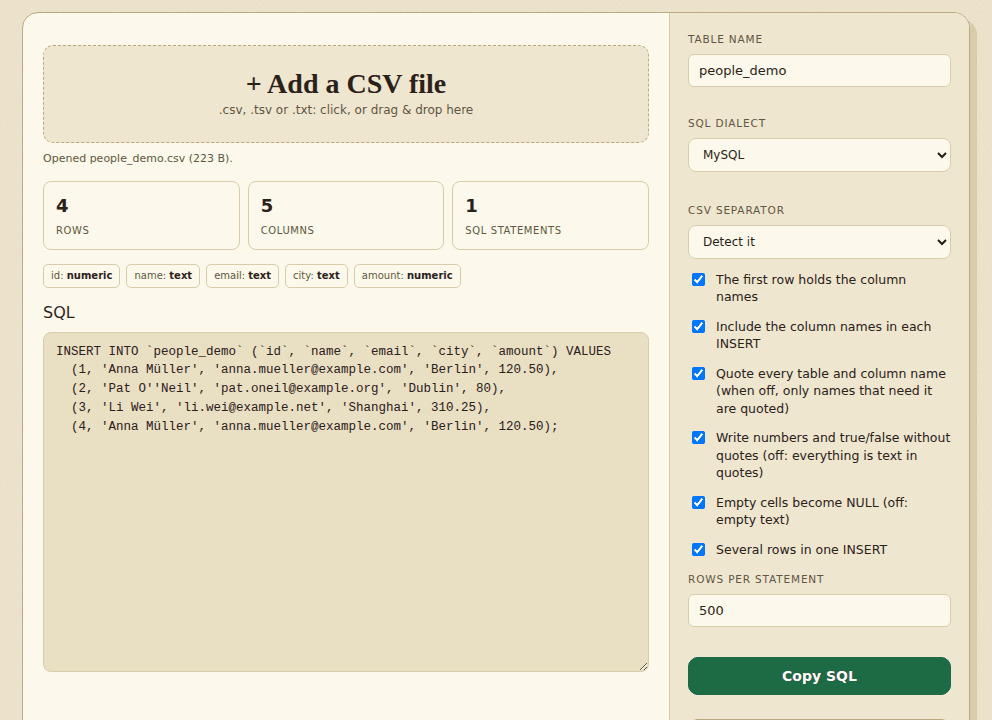
- Add your CSVOpen a .csv, .tsv or text file. The separator is detected, and you can change it.
- Choose your databasePick MySQL, PostgreSQL, SQLite or SQL Server, then set the table name and the options.
- Copy or downloadCopy the SQL, or save it as a .sql file.
Good to know
Text is escaped for the database you pick: quotes everywhere, backslashes in MySQL, and N'...' for text with accents or other non-ASCII letters in SQL Server. A column is written as numbers only when every value in it is a plain number, so zip codes like 01234 and long ids stay text, and one stray value such as N/A makes the whole column text. Empty cells become NULL. This tool writes INSERT statements only, so create the table first, and try the script on a copy of your database before you run it on the real one.
Worked example: one CSV, two databases
This is the CSV we used in our tests. It has the awkward things real files have: a zip code with a leading zero, a 20-digit id, a price with a trailing zero, a quote mark, a backslash and an empty cell.
people.csv
id,name,zip,note,amount
1,Ana O'Neil,01234,C:\temp\new,12.50
2,Zoë Müller,90210,,3
12345678901234567890,Sam Lee,007,"say ""hi""",-4.5
MySQL output (table name: people)
INSERT INTO `people` (`id`, `name`, `zip`, `note`, `amount`) VALUES
  ('1', 'Ana O''Neil', '01234', 'C:\\temp\\new', 12.50),
  ('2', 'Zoë Müller', '90210', NULL, 3),
  ('12345678901234567890', 'Sam Lee', '007', 'say "hi"', -4.5);
SQL Server output
INSERT INTO [people] ([id], [name], [zip], [note], [amount]) VALUES
  ('1', 'Ana O''Neil', '01234', 'C:\temp\new', 12.50),
  ('2', N'Zoë Müller', '90210', NULL, 3),
  ('12345678901234567890', 'Sam Lee', '007', 'say "hi"', -4.5);
What to notice:
01234and007stay text in quotes. A column is written as numbers only when every value in it is a plain number, so the zip column is safe.- The 20-digit id is also kept as text. A number that long would lose its last digits in most databases and in JavaScript.
12.50stays12.50, and-4.5is written as a number because every value in the amount column is a plain number.- The empty cell becomes
NULL, and the apostrophe in O'Neil is doubled, which every database accepts. - MySQL doubles the backslash (
C:\\temp\\new) because MySQL reads\tand\nas escapes; SQL Server and PostgreSQL leave it alone. - SQL Server puts
Nin front of text with accents (N'Zoë Müller') so the characters are not lost in a non-Unicode column. MySQL does not need this.
What changes between the four databases
| MySQL | PostgreSQL / SQLite | SQL Server | |
|---|---|---|---|
| Names are quoted with | backticks: `people` | double quotes: "people" | square brackets: [people] |
| Backslash in text | doubled | left as it is | left as it is |
| Text with accents | plain quotes | plain quotes | N'…' prefix |
| Rows per INSERT | 500 by default | 500 by default | 500 by default, 1,000 at most |
Standard SQL / other writes double-quoted names and no special prefixes. The statements create no table, so create the table first with column types that suit your data, and try the script on a copy of your database. Going the other way, the SQL to CSV tool turns INSERT statements back into a CSV. If your data starts in Excel, use XLSX to CSV first.
How we tested this
On 31 October 2026 we ran the live page in headless Chromium on a Linux cloud server, driving it the way a person would (adding files, clicking the buttons, saving the download) and checking the files it produced.
| What we checked | Result |
|---|---|
The example above in all five dialect settings: names quoted the right way, 01234, 007 and the 20-digit id kept as text, 12.50 kept, empty cell as NULL, apostrophe doubled, MySQL backslash doubled, SQL Server N prefix | 37 of 37 |
| Download file is identical to the text box, quoting can be turned off, 2 rows per INSERT gives 2 INSERTs, no page errors, no requests to other sites | 5 of 5 |
120 random CSV files (quotes, commas, semicolons, backslashes, new lines, emoji, Japanese, empty cells, NULL as text) converted in SQLite and PostgreSQL style, loaded into a real SQLite database, and compared cell by cell with the CSV | 120 of 120 |
| Total | 162 of 162 |
Not tested: MySQL, PostgreSQL and SQL Server themselves. The MySQL and SQL Server text follows each database's documented escaping rules, and the PostgreSQL-style output was loaded into SQLite, which reads the same syntax, not into PostgreSQL.
Frequently asked questions
Which databases are supported?
MySQL, PostgreSQL, SQLite and SQL Server. Each one gets its own name quoting, true/false style and text escaping. For any other database, choose Standard SQL / other.
Is my data uploaded?
No. The SQL is generated in your browser. Your file and the SQL are not saved; only your option choices are remembered.
How does it decide what is a number?
A column is written as numbers only when every value in it is a plain number such as 12, -3 or 4.50. Values with a leading zero (01234, 007), a plus sign, an exponent, thousands commas or more than 15 digits before the point stay text, and so does a column with even one other value. You can also turn number detection off so that everything is written as text in quotes.
Does it create the table?
No. It writes INSERT statements only. Create the table first, with column types that suit your data.
What happens to column names with spaces or capitals?
By default every table and column name is quoted, so spaces and capitals are kept exactly. In PostgreSQL that means later queries must quote them the same way. Turn quoting off for plain names; a name that needs quotes still gets them. Blank or repeated column names are renamed (a_2, column_3), because a table cannot have two columns with the same name.
Can I convert a big file?
Yes. Open it as a file. Each INSERT holds 500 rows by default (SQL Server allows at most 1,000). Very large scripts show only the start in the box, while Copy and Download give everything.
My data is in an Excel file. What do I do?
Save the sheet as a CSV file first, or use the XLSX to CSV tool on this site, then open the CSV here.
Where to go next
- To go the other way, read INSERT statements back into a CSV.
- Your data is in Excel? Convert the sheet to CSV first.
- Remove duplicate rows before loading, so the table does not get them twice.
When people use it
- You have a CSV and need INSERT statements to load it into a database.
- You want to try the same data on MySQL and on PostgreSQL and see how the statements differ.
- A teammate sent a spreadsheet and you want it as a quick test table.