
- Free
- Nothing uploaded
- Any of the three
How to use it
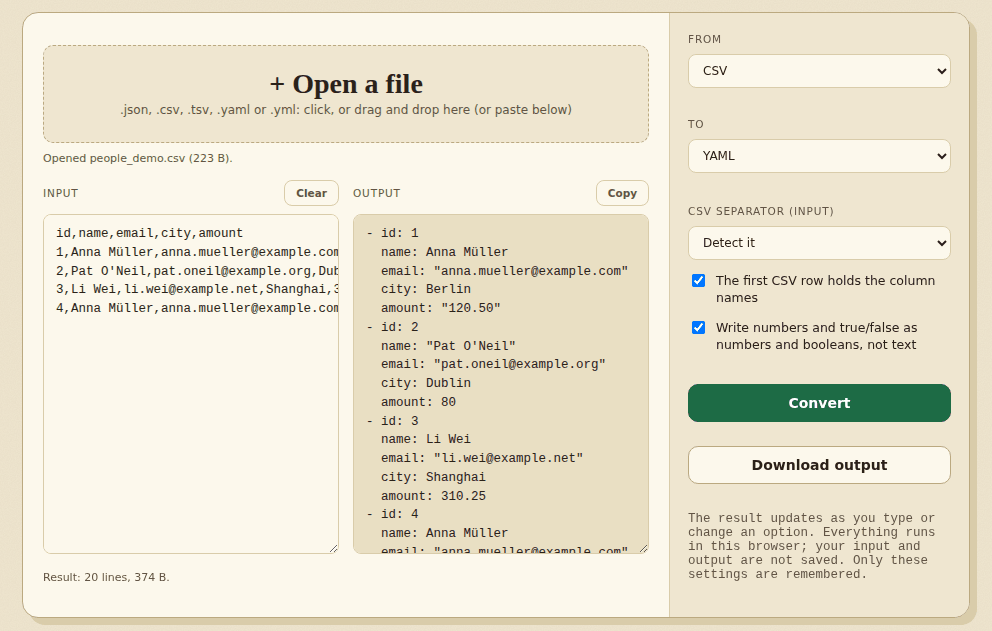
- Add your dataPaste it or open a file.
- Choose the outputJSON, CSV or YAML.
- Copy or downloadUse the converted result.
Good to know
CSV is flat, so nested JSON or YAML is flattened into columns (address.city, tags.0) or kept as JSON text in one cell, as you choose. CSV has no types, so numbers and true/false are only turned into numbers when written back exactly (007 and 1.50 stay text). YAML comments and layout are not kept, and numbers with more than 15 digits are rounded (you are told).
Worked example: nested JSON to CSV, two ways
CSV has no way to hold a list or an object inside a cell, so the tool offers two choices. Start with this JSON:
[
 {
  "id": 1,
  "name": "Ana",
  "address": {
   "city": "Lagos",
   "zip": "01234"
  },
  "tags": [
   "a",
   "b"
  ]
 },
 {
  "id": 2,
  "name": "Sam",
  "address": {
   "city": "Oslo",
   "zip": "0150"
  },
  "tags": [
   "c"
  ]
 }
]
Flatten into columns (the default)
id,name,address.city,address.zip,tags.0,tags.1
1,Ana,Lagos,01234,a,b
2,Sam,Oslo,0150,c,
Keep nested values as JSON text
id,name,address,tags
1,Ana,"{""city"":""Lagos"",""zip"":""01234""}","[""a"",""b""]"
2,Sam,"{""city"":""Oslo"",""zip"":""0150""}","[""c""]"
Flattening names each column after its path (address.city, tags.0) and leaves a blank where a row has no value, as in the second row's tags.1. Use it when the CSV is for a spreadsheet. Keeping the nested values as JSON text is better when you will convert the CSV back to JSON later. Zip codes such as 01234 keep their leading zero either way.
Worked example: YAML with anchors
YAML files often reuse a block with an anchor (&base) and a merge key (<<: *base). The tool resolves them, so the JSON has the full values:
YAML in
base: &base
  retries: 3
  host: localhost
prod:
  <<: *base
  host: example.org
  ports: [80, 443]
note: |
  line one
  line two
ver: 0123
when: 2026-10-31
JSON out
{
  "base": {
    "retries": 3,
    "host": "localhost"
  },
  "prod": {
    "retries": 3,
    "host": "example.org",
    "ports": [
      80,
      443
    ]
  },
  "note": "line one\nline two\n",
  "ver": "0123",
  "when": "2026-10-31"
}
Three things to notice: prod inherits retries: 3 from base and overrides host; the block of text keeps its line break; and 0123 and 2026-10-31 stay text, because turning them into a number or a date would change them.
Edge cases that surprise people
- Long numbers. JSON and YAML readers keep about 15 digits. For
{"id":12345678901234567890}the tool writes12345678901234567000and tells you: “1 number in the input has more than 15 digits … so it was rounded. To keep every digit, put such values in quotes in the source.” - CSV types. Reading a CSV into JSON,
1and10become numbers, while01234and4.50stay text because writing them back as numbers would change how they look. Turn type detection off to get text everywhere. - YAML 1.2. A bare
1e5is read as the number 100000, as the YAML 1.2 rules say. Some older tools, such as PyYAML, read it as text; quote the value if you need text. - Lost on the way. YAML comments and layout cannot be kept, because JSON and CSV have nowhere to put them.
Need to look at the CSV in a grid? Open it in the XLSX reader. Going to a database? Use CSV to SQL.
How we tested this
On 31 October 2026 we ran the live page in headless Chromium on a Linux cloud server, driving it the way a person would (adding files, clicking the buttons, saving the download) and checking the files it produced.
| What we checked | Result |
|---|---|
Nested JSON to CSV both ways, YAML anchors and merge keys, block text, 0123 and dates kept as text, CSV types on and off, 20-digit warning, semicolon CSV, no page errors, no requests to other sites | 16 of 16 |
60 random nested documents (maps, lists, numbers, true/false, empty text, accents, Japanese, text such as 007, yes, null): JSON to YAML and back, compared with the original | 60 of 60 |
| 45 more random documents written as YAML by PyYAML, read by the tool as JSON and compared with PyYAML's own reading | 45 of 45 |
| Total | 121 of 121 |
Not tested: Very large files, YAML written by tools other than PyYAML, and comments (they are dropped by design). We skipped random values such as 1e5 in the PyYAML comparison, because PyYAML and YAML 1.2 read it differently.
Frequently asked questions
Which formats are supported?
JSON, CSV and YAML, in any direction between them.
Is my data uploaded?
No. The conversion happens in your browser.
What happens to nested data in CSV?
By default it is flattened into columns named like address.city and tags.0. You can instead keep each nested value as JSON text in one cell.
How much of YAML is understood?
The YAML 1.2 features most files use: nested maps and lists, flow lists and maps, block text, anchors, merge keys and several documents in one file. Dates and values like 0123 are kept as text.
Can I convert a big file?
Yes. Open it as a file rather than pasting. Very large results show only the start in the box, while Copy and Download give everything.
Where to go next
- To load tabular data into a database, generate SQL INSERT statements.
- Starting from Excel? Convert the sheet to CSV first.
- To combine several CSV exports, merge them into one.
When people use it
- An API returns JSON and a colleague wants to read it in Excel.
- A configuration file in YAML has to become JSON for another tool.
- You have a CSV and a program that only accepts JSON.